Accedi al tuo account
or
L'utente della casella di posta esiste già
By clicking 'Download File,' you agree to our Terms and conditions and Privacy policy
loadToolAd
sign_pdf

Firma PDF

Strumento di firma PDF. Firma il tuo documento.
Questa funzione supporta la versione di sistema 15.7.2 e successivi, se non lo hai, vai alle impostazioni per aggiornare il sistema.
upload
google-drive Google Drive
dropbox Dropbox
0%
Non chiudere il browser. Aspetta finché i tuoi file vengono caricati e elaborati! Potrebbe richiedere alcuni minuti. :)
File
Open Source Statement
Advertisement
Come Firma PDF
Passaggio 1: Caricare
Caricare il file nella nostra firma PDF online
th
th
Passaggio 2: Cliccare 'Convertire'
Aggiungere la firma se necessario
Passaggio 3: Cliccare 'Scaricare'
Visualizzare in anteprima online, modificare o scaricare il file
th

Come firmare file PDF online?

01 Qual è il modo più semplice per firmare un PDF?

QwerPDF offre un firmatario PDF online gratuito. Carica il tuo PDF e aggiungi firme elettroniche. Disegna, digita o carica immagini di firme. Non è necessaria alcuna installazione di software.

02 Posso aggiungere una firma scritta a mano a un PDF?

Sì! Disegna la tua firma usando il mouse o il touchscreen. QwerPDF cattura la tua firma e la posiziona sul documento PDF.

03 Le firme elettroniche sono legalmente valide?

Sì! Le firme elettroniche sui PDF sono legalmente vincolanti nella maggior parte dei paesi. Soddisfano i requisiti legali per la firma dei documenti.

sign_pdf

Come aggiungere una firma a un PDF online?

Scopri come firmare documenti PDF utilizzando strumenti online gratuiti.

  • Sì! QwerPDF offre la firma PDF completamente gratuita. Non è necessaria registrazione. Carica il tuo PDF e aggiungi la firma istantaneamente.
  • Non ci sono costi per file. Tutte le funzionalità di firma di base sono gratuite.
  • Aggiungi firme testuali, disegna firme o carica immagini di firme. È disponibile la funzionalità completa.
sign_pdf

Posso firmare PDF su mobile?

Sì! QwerPDF funziona su dispositivi mobili. Firma PDF utilizzando il tuo smartphone o tablet.

Posso firmare PDF su iPhone?

Sì! Apri QwerPDF in Safari su iPhone. Carica il tuo PDF, aggiungi la firma usando il tocco e scarica il documento firmato.

Posso firmare PDF su Android?

Sì! Usa qualsiasi browser su Android per accedere a QwerPDF. Firma documenti direttamente sul tuo telefono.

Il supporto mobile supporta tutti i tipi di firma?

Sì! Tutte le funzionalità di firma funzionano su mobile. Disegna, digita o carica immagini di firme su qualsiasi dispositivo.

Firma PDF Online - Firma Elettronica Gratuita

Firmatario PDF Gratuito

QwerPDF offre un firmatario PDF gratuito. Aggiungi firme elettroniche ai documenti. Non è necessaria alcuna installazione.

Disegna firma

Disegna la tua firma con il mouse o il tocco. Crea firme elettroniche personalizzate per qualsiasi documento.

sign_pdf

Digita firma

Digita il tuo nome e scegli lo stile della firma. Crea firme professionali basate su testo istantaneamente.

sign_pdf
Anwendungsfall
Verträge & HR-Pakete
Ausgabe
Unterzeichnetes PDF-Download
Wissen
Bild vs. rechtliche elektronische Unterschrift
Dann
PDF schützen · Flatten

PDF online unterschreiben – elektronische Unterschrift hinzufügen, ohne zu drucken

PDF online unterschreiben – Unterschrift im Browser auf PDF platzieren

PDF unterschreiben, digitale Unterschrift PDF (PKI-Klassentools unterscheiden sich), und e-sign PDF online-Suchen treiben HR-, Vertriebs- und Immobilien-Workflows an, die müde von Druck-Unterschrift-Scan-Schleifen sind. QwerPDF überlagert gezeichnete oder Bildunterschriften auf das hochgeladene PDF – schnell für routinemäßige Bestätigungen; kombinieren Sie es mit einer rechtlichen Überprüfung, wenn Gesetze geprüfte e-sign-Plattformen erfordern.

Elektronische vs. digitale Unterschriften

Getippte Namen und eingefügte JPEG-Unterschriften sind praktisch, aber schwache Beweise im Vergleich zu PKI-gestützten digitalen Unterschriften in Acrobat Sign oder DocuSign-Klassikprodukten.

Wissen Sie, welche Gerichtsbarkeit welche Methode für Ihren Dokumenttyp akzeptiert, bevor Sie sich allein auf das Unterschreiben im Browser verlassen.

Flatten und Manipulationssicherheit

Flatten, wenn Sie eine lockere Nicht-Bearbeitbarkeit benötigen – denken Sie daran, dass Flattening keine Verschlüsselung ist.

Das Platzieren einer Unterschrift macht viele bestehende digitale Zertifikate auf dieser Datei ungültig – signieren Sie Kopien, behalten Sie Goldmaster.

Mobil: Fingergezeichnete Unterschriften sehen wackelig aus – importieren Sie einen transparenten PNG-Scan für eine sauberere Markenanpassung.

Initialen auf jeder Seite

Wenn das Tool mehrere Stempel unterstützt, fügen Sie Initialen pro Seite hinzu; andernfalls duplizieren Sie die Unterschriftsobjekte sorgfältig.

Formulare plus Unterschriften

Füllen Sie zuerst das PDF-Formular aus, unterschreiben Sie dann und flatten Sie, wenn die Empfänger die Antworten nicht ändern dürfen.

Datentext in der Nähe von Unterschriften, wenn Verträge Ausführungsdaten erfordern.

Passwort-PDFs

Entsperren Sie das PDF, wenn es erlaubt ist, bevor die Unterschriftwerkzeuge neue Anmerkungen schreiben können.

Zeugenlinien

Mehrere Unterzeichner benötigen möglicherweise sequentielle Downloads – koordinieren Sie die Versionskontrolle, um das Unterzeichnen veralteter PDFs zu vermeiden.

SEO-Cluster

Unterschrift online zu pdf hinzufügen, pdf-Unterschrift kostenlos, elektronische Unterschrift pdf ohne Acrobat, pdf auf iphone unterschreiben.

Wann man nicht online unterschreiben sollte

Classified, HIPAA, or counsel-forbidden uploads belong offline.

Come Firma PDF

Firma PDF Gratuita Online

QwerPDF ti aiuta a firmare file PDF online. Aggiungi firme elettroniche ai documenti. Veloce e gratuito.

Passaggio 1: Caricare
Caricare il file nella nostra firma PDF online
add file
Edit
Passaggio 2: Cliccare 'Convertire'
Aggiungere la firma se necessario
Passaggio 3: Cliccare 'Scaricare'
Visualizzare in anteprima online, modificare o scaricare il file
add file
Review converted PDF as Word document

Sign PDF — Frequently asked questions

How do I sign a PDF online without printing and scanning?
Upload the PDF to QwerPDF sign PDF, place your signature where needed, download the signed file. This replaces the old print-sign-scan loop for many routine acknowledgements.
Is an electronic signature from QwerPDF legally binding?
Laws vary by country and document type. QwerPDF helps you overlay a signature image or text, but high-stakes contracts may need regulated e-sign platforms with audit trails—ask legal for your jurisdiction.
Can I add initials on every page?
If the tool supports multi-place stamps, add initials per page; otherwise duplicate signature objects per page carefully. Preview every page before download.
Will signing invalidate existing digital certificates in the PDF?
Often yes because bytes change. Sign a copy; keep the original certified PDF untouched if validity matters.
How do I use a transparent PNG signature?
Upload a clean scan with white removed to transparency for nicer overlays. Keep file size small to avoid bloating the PDF.
Can recipients remove my signature?
Without flattening or rights restrictions, savvy users might edit content. Flatten when you need a harder stop to casual edits (not cryptographic security).
What is the difference between digital signature and electronic signature?
Digital signatures use PKI to prove integrity and signer identity. Electronic signatures can be simple images or typed names—convenience vs proof strength.
Can I sign on mobile with finger?
If the UI supports drawing, yes—signatures may look shaky; import a pre-made PNG if brand guidelines require crisp ink.
How do I date-stamp near my signature?
Add a text date field beside the signature graphic if the product allows multiple annotations; otherwise type date in adjacent form field.
Does QwerPDF support witness countersign lines?
Use text boxes or additional signature placements if supported; complex witness routing may need dedicated e-sign products.
Why does Adobe say the document was changed after signing?
Any post-sign edit triggers warnings. Finalize all content before signing, or sign last in the workflow.
Can I sign password-protected PDFs?
Unlock permitted PDFs first, sign, then optionally re-protect with protect PDF.
How do I send signed PDFs securely?
Use encrypted email or access-controlled cloud links; signing alone does not encrypt the file.
What if signature appears huge on first placement?
Resize handles should scale proportionally; set a max width consistent with line spacing in the document.
Can HR use QwerPDF for I-9 or government forms?
Only if agency rules allow your chosen signature method—many government PDFs specify portal workflows instead of generic image signatures.

Unisciti a oltre 12.000.000 di professionisti produttivi

che si affidano a QWER PDF per conversioni rapide e precise.

Todas las herramientas
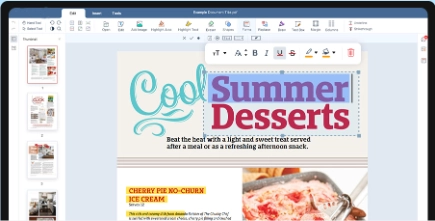
Ecco alcune delle funzioni del nostro editor PDF:
Il nostro editor PDF online tutto-in-uno rende facile modificare, unire ed esportare in Word.
th
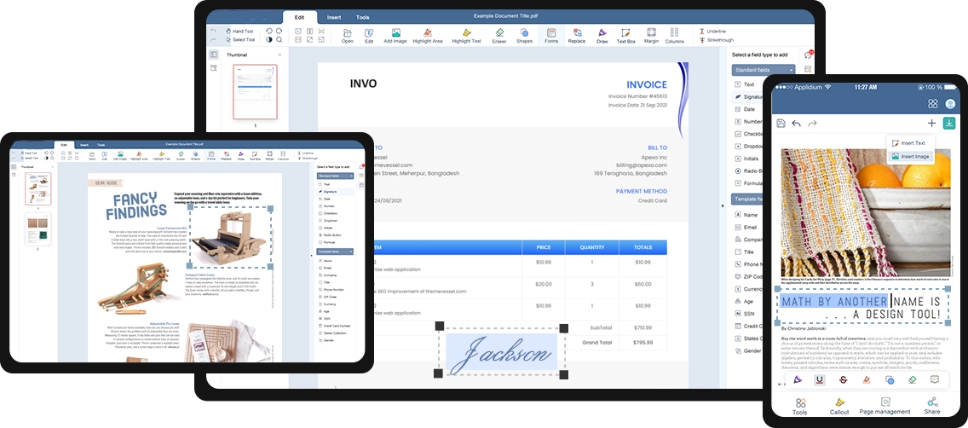
Modifica Universale dei PDF Online
Su Tutti i Tuoi Dispositivi
Aumenta la produttività dei tuoi documenti su tutte le principali piattaforme: Windows, Mac, iOS e dispositivi Android.
th
Salva il documento come
Seleziona un file da salvare
 online WORD Word
 online Sheet Sheet
 online Powerpoint Powerpoint
 online close
Il tuo documento è quasi pronto!
Scegli il tuo formato:
Document name:
0%
Non chiudere il browser. Aspetta finché i tuoi file vengono caricati e elaborati! Potrebbe richiedere alcuni minuti. :)
 online close