Login to your account
or
The mailbox user already exists
By clicking 'Download File,' you agree to our Terms and conditions and Privacy policy
loadXY
indexadcontainer
mindexadtopAd

QwerPDF Online
Convert Tool

All tools are 100% free Use. Convert PDF to Word(DOCX) & Excel(XLSX), Merge, split, and add watermark PDF with Word online editor

Start Now
Advertisement
QwerPDF Hero Image
Advertisement
ONLINE OFFICE
See All Tools

Your All-in-One Online Document Solution

01 PDF Tools

Convert, merge, split, and compress PDF files with high precision and reliability directly in your web browser.

02 Office Online

Create, view, and edit Word, Sheet, and PowerPoint documents without mandatory software installation.

03 Secure & Fast

Process your documents quickly within a secure environment using industry-standard encryption to protect your privacy.

index

A Comprehensive Document Suite
for Professionals and Students

QwerPDF provides a versatile workspace to manage all your document needs across various devices—PC, tablet, or mobile—with no mandatory downloads.

  • Easily convert between PDF and Office formats
  • Reliable tools for editing and formatting documents
  • Secure cloud-based processing for data safety
index

How to use QwerPDF's Online Tools?

A simple 3-step process designed for fast document management, allowing you to work efficiently from any location.

Upload or Create

Upload your existing files into our online tools, or start a new document from scratch with just one click.

Process and Edit

Use our featured interface to modify content, adjust layouts, or convert formats in real-time within your browser.

Download and Share

Once you're finished, simply download your processed file as a high-fidelity document, ready for immediate use.

Transform Your Browser into a

Capable Online Office Hub

Experience the freedom of managing documents anywhere. QwerPDF is optimized for performance and broad compatibility across all platforms.

Work across all devices

Whether you're on a mobile device or a desktop, our cloud-based platform allows you to access and modify your documents on the go.

index

Reliable privacy security

Your privacy is our priority. We use industry-standard encryption to help ensure that your documents are processed safely and remain private.

index
Tools
PDF to Word, Excel, JPG & more
How it works
Browser upload → download
Install
None — free online PDF tools
Typical use
Compress, merge, split, convert

Free online PDF converter & editor — what QwerPDF is built for

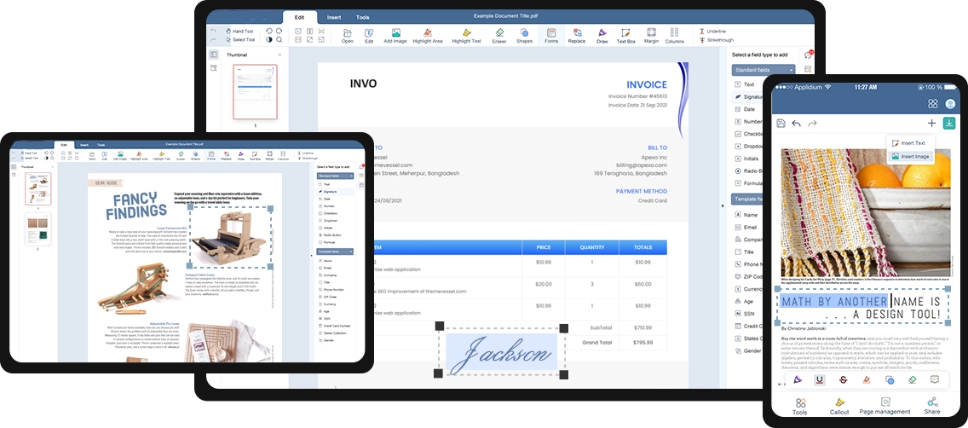
QwerPDF homepage tools — PDF to Word, merge PDF, compress PDF, and more in the browser

People land on QwerPDF when they search for a free PDF converter online, PDF to Word, merge PDF, compress PDF, or split PDF and want a straight path: pick a tool, upload a file, download the result. The site groups the same jobs you would otherwise solve with desktop suites—Word to PDF, Excel to PDF, JPG to PDF, PDF to JPG, edit PDF, sign PDF, protect PDF, unlock PDF—into lightweight browser flows so a borrowed laptop or locked-down office PC is enough.

One hub for “I need this file in another format”

Conversion is the core SEO journey: PDF to Word for contracts you must edit, PDF to Excel for tables that should live in cells, PDF to PowerPoint for slide decks you need to reuse, PDF to HTML for quick web snapshots, and image round-trips (PDF to JPG, PDF to PNG, then JPG to PDF or PNG to PDF) for attachments and CMS assets.

Utility tools sit beside converters: compress PDF when Gmail or Outlook rejects a 30 MB attachment, merge PDF or combine PDF when you are building a packet, split PDF when you only need chapter 3, remove PDF pages for clean exports, add page numbers for court or school packets, watermark PDF for DRAFT passes, PDF form filling, create PDF, and save as PDF shortcuts.

Editing, signing, and security without installing Acrobat

Beyond conversion, QwerPDF covers PDF editor touch-ups (typos, highlights, images), sign PDF for routine approvals, password protect PDF before external share, and unlock PDF when you have rights to remove an open password that blocks merge or compress.

Online Word editor, Excel editor, and PowerPoint-style flows address “no Microsoft Office on this machine” scenarios—upload DOCX, XLSX, or PPTX, change what you need, download—then optionally run Word to PDF or Excel to PDF for a fixed-layout handoff.

SEO tip for you as a user: If you are unsure which tool to pick, search the action you need (for example reduce PDF file size, extract pages from PDF, convert PDF to Word online free) and match it to the card label on QwerPDF—each flow is scoped so you are not forced through an unrelated wizard.

Quality, limits, and realistic expectations

No honest online PDF to Word service promises pixel-perfect layout for every scan or magazine PDF. QwerPDF aims to cut rework: real paragraphs and tables when the PDF contains them, clear download steps, and predictable errors (password locked, file too large, odd generators) you can fix with unlock, split, or re-export from Word or Excel.

Privacy habits that pair with “free” tools

Use HTTPS (the live site does), avoid public Wi‑Fi for HR or healthcare PDFs, and read the privacy policy for retention. If your contract forbids cloud processing, keep those files in an offline toolchain your security team approves.

For marketing teams, treat QwerPDF as the fast lane for PDF to Word or PDF to Excel drafts, then finish brand and compliance in desktop Office.

Mobile vs desktop for long documents

Phones work for compress PDF, PDF to JPG, or quick sign PDF tasks. Long merge PDF jobs or PDF to Word QA are easier on a laptop where you can compare pages side by side.

After download: a fast QA pass

Scroll the output once, search for a unique keyword, click a few hyperlinks, and spot-check tables if money is involved. If you merge PDF packets for clients, verify page order and file name (ClientName-board-pack-v2.pdf) before sending.

When to keep the PDF instead of converting

If the file is the signed legal artifact, a redacted disclosure, or a print-ready flyer, PDF may stay the final format. Convert only when you truly need cells, slides, or flowing paragraphs.

How QwerPDF fits next to Google Drive or Microsoft 365

Drive and 365 are great homes for storage and coauthoring. QwerPDF is the quick wrench: unlock PDF, merge PDF, compress PDF, then email—or PDF to Word, edit two paragraphs, Word to PDF for return. Use whichever layer matches the minute you are in.


How to QwerPDF Online
Convert Tool

Convert, Edit, and Manage Documents with Ease

Review converted PDF as Word document

QwerPDF free online PDF tools — Frequently asked questions

Is QwerPDF really free for PDF to Word, merge, split, and compress?
Yes — the core tools on QwerPDF are built for quick browser jobs without a paid plugin to get started: upload your file, process it, and download the result. For regulated documents, still follow your company rules on cloud processing.
Do I need to install Adobe Acrobat or Microsoft Office to use QwerPDF?
No installation is required for the online flows. You upload in Chrome, Edge, Firefox, or Safari and download the output. You only need Word or Excel locally if you want to edit a converted DOCX or XLSX after download.
Which QwerPDF tool should I use: PDF to Word, PDF to Excel, or the PDF editor?
Use PDF to Word when you need flowing paragraphs and headings in DOCX. Use PDF to Excel when tables or invoices must land in cells. Use the PDF editor when you only need small fixes (text, images, highlights) while keeping the file as PDF.
Why does my PDF to Word or PDF to Excel conversion look different from the original PDF?
PDF fixes every glyph on a page; Word and Excel expect flowing text and real tables. Complex magazines, multi-column layouts, and scanned pages often need a short cleanup pass. QwerPDF focuses on reducing that rework, not promising pixel-perfect layout cloning.
Can I merge or split a password-protected PDF on QwerPDF?
Open passwords and permission locks usually need to be removed first using the unlock flow (where you are legally allowed). After the PDF opens normally in a viewer, upload it again for merge, split, or compress.
How do I email a PDF that is over 25 MB without ruining quality?
Try QwerPDF’s compress PDF first, prefer “lighter images” over crushing text. If it is mostly scans, consider splitting chapters into separate PDFs so each attachment stays under your mail server limit.
Is it safe to upload contracts or tax PDFs to an online converter?
Use HTTPS (QwerPDF does), avoid public Wi‑Fi for sensitive files, and read the privacy policy for retention. If your contract forbids third-party processing, stop and use an offline tool chain your security team approves.
What should I do when the page says processing failed or the download never starts?
Check file size and network stability, disable aggressive ad blockers for the site, try a private window, and re-export the PDF from the original app to remove odd layers. Password-protected or corrupted PDFs are the most common causes.
Does QwerPDF support scanned PDFs and OCR for PDF to Word?
Scanned pages only become editable text when OCR runs successfully. If you cannot select text in a PDF reader, treat the file as an image pipeline first. Higher-resolution scans (around 300 DPI) and good contrast improve OCR results.
Can I use QwerPDF on my phone for PDF to JPG or image to PDF?
Mobile browsers work for many one-off conversions. Pick files from Photos or Drive, download the ZIP or images, then open them in your viewer. Long documents or huge images are still easier to check on desktop.
How is QwerPDF different from “print to PDF” in my browser?
Print to PDF is great for freezing a web page as a snapshot. QwerPDF’s converters target structured outputs—DOCX, XLSX, PPTX, or cleaned PDFs—with steps tuned for attachments, forms, and reuse rather than a single raster print.
Can I sign PDFs, add watermarks, and add page numbers in the same project?
Those are separate focused tools: sign PDF for signatures, watermark PDF for branding text, page number for footers. Run them in a sensible order (for example edit content first, then watermark, then flatten if you need a non-editable handoff).
Will hyperlinks and bookmarks survive merge or split?
Many standard links survive, but bookmark trees can change when pages move. After merge or split, click-test critical links and regenerate a table of contents in Word if that is your next editing step.
What file types besides PDF does QwerPDF convert?
The home grid covers common round-trips: Word, Excel, PowerPoint, JPG, PNG, HTML to PDF and PDF back to those formats, plus utilities like compress, merge, split, unlock, protect, and sign. Pick the card that matches your source file.
When should I avoid any online PDF service entirely?
When law, healthcare rules, or client contracts require air-gapped or on-prem-only processing. In those cases keep data inside approved enterprise PDF software and use QwerPDF only for non-sensitive personal files.

Join 12,000,000+ productive professionals

Who trust QWER PDF for fast, accurate conversions.