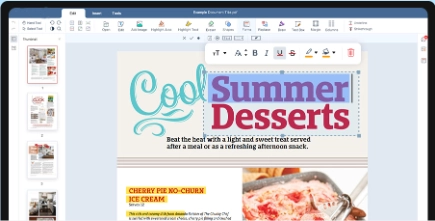
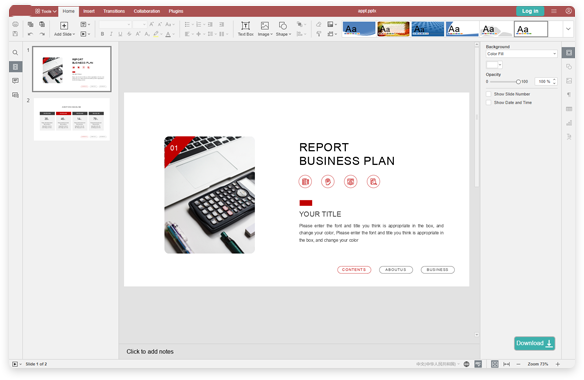
Mitä sinun kannattaa tietää PDF Onlinesta, PDF-tiedostoista ja työpöydän PDF-ohjelmistoista
Ihmiset etsivät PDF Onlinea, verkon PDF-editoria tai tapaa muokata PDF:ää verkossa, kun heidän täytyy saada jotain valmiiksi heti — eivät silloin, kun he haluavat säätää asennusohjelmien tai tilausten kanssa. Ehkä käytät koulun Chromebookia, toimiston yhteistä tietokonetta tai työkannettavaa, joka estää uusien ohjelmien asentamisen. QwerPDF PDF Online pitää asiat yksinkertaisina: avaa PDF selaimessa, tee muutokset ja lataa — tekemättä jokaisesta pienestä korjauksesta kokonaista Adobe Acrobat -projektia.
Miten PDF:n muokkaus selaimessa eroaa työpöydän PDF-ohjelmistosta
Työpöytätyökalut, kuten Adobe Acrobat, on tehty pitkiin työrupeamiin: painoa edeltävät tarkistukset, peittäminen, kehittyneet lomakkeet, varmenteisiin perustuvat digitaaliset allekirjoitukset ja eräautomaatio. QwerPDF:n kaltainen PDF Online -työkalu keskittyy siihen, mitä useimmat arkiset tiedostot tarvitsevat — tekstin korjaamiseen, muistiinpanojen ja kuvien lisäämiseen, sivujen tarkistamiseen — ja vie sinut nopeasti puhtaan PDF:n lataukseen. Vaihdat muutaman edistyneen toiminnon nopeuteen: ei odottelua raskaan sovelluksen käynnistymistä eikä pohdintaa siitä, onko tällä koneella oikea lisenssi.
Se ei tarkoita ”vähemmän vakavaa”. Laskut, ilmoitukset, ilmoittautumislomakkeet ja yksisivuiset sopimukset tarvitsevat useimmiten vain pieniä muutoksia. Tällaisissa tapauksissa muokkaa PDF:ää verkossa, lataa ja lähetä se — ja avaa sama tiedosto myöhemmin työpöytäeditorissa, jos joku tarvitsee edistyneitä toimintoja.
Mikä on PDF-tiedosto — ja miksi tekstiä on joskus vaikea muokata?
PDF (Portable Document Format) tallentaa tekstin, fontit, kuvat ja jokaisen elementin tarkan sijainnin, joten asiakirja näyttää samalta millä tahansa näytöllä tai tulostimella. Siksi PDF on valmiiden asiakirjojen jakamisen vakiomuoto. Toisin kuin Word-tiedosto, PDF ei koostu virtaavista kappaleista: jokainen rivi on kiinteissä koordinaateissa. Tämä takaa uskollisen asettelun, mutta laajat uudelleenkirjoitukset kannattaa tehdä lähdetiedostossa.
Jos PDF on peräisin skannauksesta, sivut voivat olla kuvia tekstistä oikean tekstin sijaan, eikä niitä voi muokata sana sanalta ennen tekstintunnistusta (OCR). Jos fonttia ei ole upotettu, muokattu teksti voi näkyä samankaltaisella korvaavalla fontilla. Tarkista muuttamasi sivut ennen lähettämistä tai tulostamista.
Käytännön vinkki: Jos tiedostosi vaatii varmennettuja digitaalisia allekirjoituksia, arkaluonteisten tietojen pysyvää peittämistä tai painotalon väritarkistuksia, tee nämä vaiheet erillisessä työpöydän PDF-ohjelmistossa. QwerPDF PDF Online on tehty arkisiin PDF-korjauksiin ja -tarkistuksiin — ei jokaiseen ammattimaiseen erikoistoimintoon.
Kuka hyötyy QwerPDF PDF Onlinesta eniten?
Opiskelijat ja opettajat voivat avata materiaaleja ja lisätä niihin merkintöjä millä tahansa luokan tietokoneella. Etätyöntekijät korjaavat raportin kirjoitusvirheen pyytämättä IT:ltä asennusta. Pienyritykset päivittävät hinnaston tai ilmoituksen ja lähettävät puhtaan PDF:n ostamatta uutta lisenssiä yhteiselle koneelle. Jokainen, joka on joskus ajatellut ”minun tarvitsee vain muuttaa yksi rivi tässä PDF:ssä”, pääsee perille nopeammin PDF Onlinella kuin täydellä työpöytäpaketilla.
PDF Online vs. Adobe Acrobatin verkkotyökalut
Adoben verkkotyökalut ovat kyvykkäitä ja tuttuja, jos sinulla on jo Adobe-tili ja tilaus. QwerPDF PDF Online on niille, jotka asettavat tiedoston etusijalle: lataa PDF, napsauta Seuraava, muokkaa tai tarkastele PDF:ää verkossa ja napsauta sitten Lataa. Et valitse toista asiakirjatyyppiä — saat vain nopeamman pääsyn silloin, kun ohjelmiston asentaminen tai kirjautuminen uudelle tilille ei ole juuri silloin paras vaihtoehto.
Muokatun PDF:n lähettäminen muille
Useimmat vastaanottajat avaavat PDF:n yksinkertaisesti selaimessa, puhelimessa tai työpöytälukijassa. Kun olet muokannut PDF:ää verkossa QwerPDF:llä, lataa se, anna tiedostolle selkeä nimi (esimerkiksi Lasku-2026-03-lopullinen.pdf) ja lähetä se tavalliseen tapaan. Koska PDF pitää fontit ja asettelun yhdessä, vastaanottajat näkevät yleensä täsmälleen saman kuin sinä selaimessa.
Kun tavoitteena on ”ei enää muutoksia”, PDF on jo valmiiksi turvallisin muoto: asettelu on lukittu, eikä lukuja muuteta helposti vahingossa. Jos jonkun täytyy jatkaa sisällön uudelleenkirjoittamista, jaa myös lähdetiedosto (esimerkiksi DOCX) tai muunna PDF ensin Wordiksi.
PDF vai Word: kummassa muodossa työskennellä?
PDF on paras lopulliseen toimitukseen — sopimukset, lomakkeet, jotka eivät saa siirtyä, ja kaikki, mikä tulostetaan tai arkistoidaan. DOCX on parempi, kun sisältö vielä muuttuu paljon. Nyrkkisääntö: kirjoita Wordissa, toimita PDF:nä ja käytä PDF Onlinea viime hetken pieniin korjauksiin, joiden vuoksi ei kannata palata lähdetiedostoon. Jos paljon täytyy kirjoittaa uudelleen, muunna PDF Wordiksi, muokkaa ja vie uusi PDF.
PDF Onlinen käyttö lainatulla tai yhteisellä tietokoneella
QwerPDF PDF Online on tehty kannettavan tai pöytäkoneen työpöytäselaimille — kirjaston koneille, kollegan työpisteelle tai hotellin liikekeskukseen, joissa ohjelmistojen asentaminen ei ole mahdollista. PDF:n avaaminen selaimessa on parempi kuin asennusohjelman etsiminen tai kirjautuminen jonkun toisen tilille. Kun olet valmis, lataa tiedostosi ja sulje välilehti, jotta mitään ei jää auki yhteiselle koneelle.
Skannereista, puhelimista ja muista sovelluksista peräisin olevat PDF:t
Kaikkia PDF-tiedostoja ei luoda samalla tavalla. Wordista, Google Docsista tai suunnittelutyökaluista viedyt tiedostot sisältävät yleensä oikeaa tekstiä, jota on helppo muokata. Skannereista tai puhelimen kamerasovelluksista peräisin olevat PDF:t ovat usein sivujen kuvia; voit silti tarkastella niitä, lisätä merkintöjä ja kirjoittaa tekstiä päälle, mutta alkuperäisten sanojen muuttaminen vaatii ensin OCR:n. Jos tiedosto käyttäytyy oudosti, vie se uudelleen alkuperäisestä sovelluksesta tai tulosta se uudeksi PDF:ksi ennen muokkaamista.
Kun tiedosto näyttää väärältä: nopea tarkistuslista
Jos muokattu teksti näyttää erilaiselta, tarkista, oliko alkuperäinen fontti upotettu — puuttuvat fontit ovat yleisin syy. Tarkista sitten, onko sivu skannattu kuva oikean tekstin sijaan. Kolmanneksi, jos tiedosto on salasanasuojattu tai rajoitettu, avaa sen lukitus omistajan luvalla ennen muokkaamista. Lopuksi vioittuneiden tai erittäin suurten tiedostojen kohdalla kokeile tallentaa uudelleen tai jakaa PDF ja ladata pienempi osa.
Tietoturva, yksityisyys ja hyvät tavat
Jokainen verkon PDF-editori ansaitsee saman huolellisuuden kuin sähköposti tai pilvitallennus: lataa vain tiedostoja, jotka saat jakaa kyseisen palvelun kanssa, ja vältä luottamuksellisia tietoja, jos organisaatiosi niin vaatii. Toiminnassa olevalla QwerPDF-sivustolla tiedostosi poistetaan automaattisesti palvelimiltamme kolmenkymmenen minuutin kuluessa tallentamisesta tai lataamisesta — virallinen sanamuoto löytyy aina voimassa olevasta tietosuoja- ja säilytyskäytännöstä.

 Työkalut

 Word ONLINE
 Sheet ONLINE
 Presentation ONLINE
 Create
 Document
 Sheet
Sheet
 Presentation